Joy of hearing for everyone VoicyCare A music player app designed to support clearer listening with up to 500% (5x) volume boost.

App Store 5.0 / 5 (2 ratings)
Up to 500% (5x) Volume
Readable, Easy-to-use UI
Multi-Cloud Support
Update v1.4.6 Released
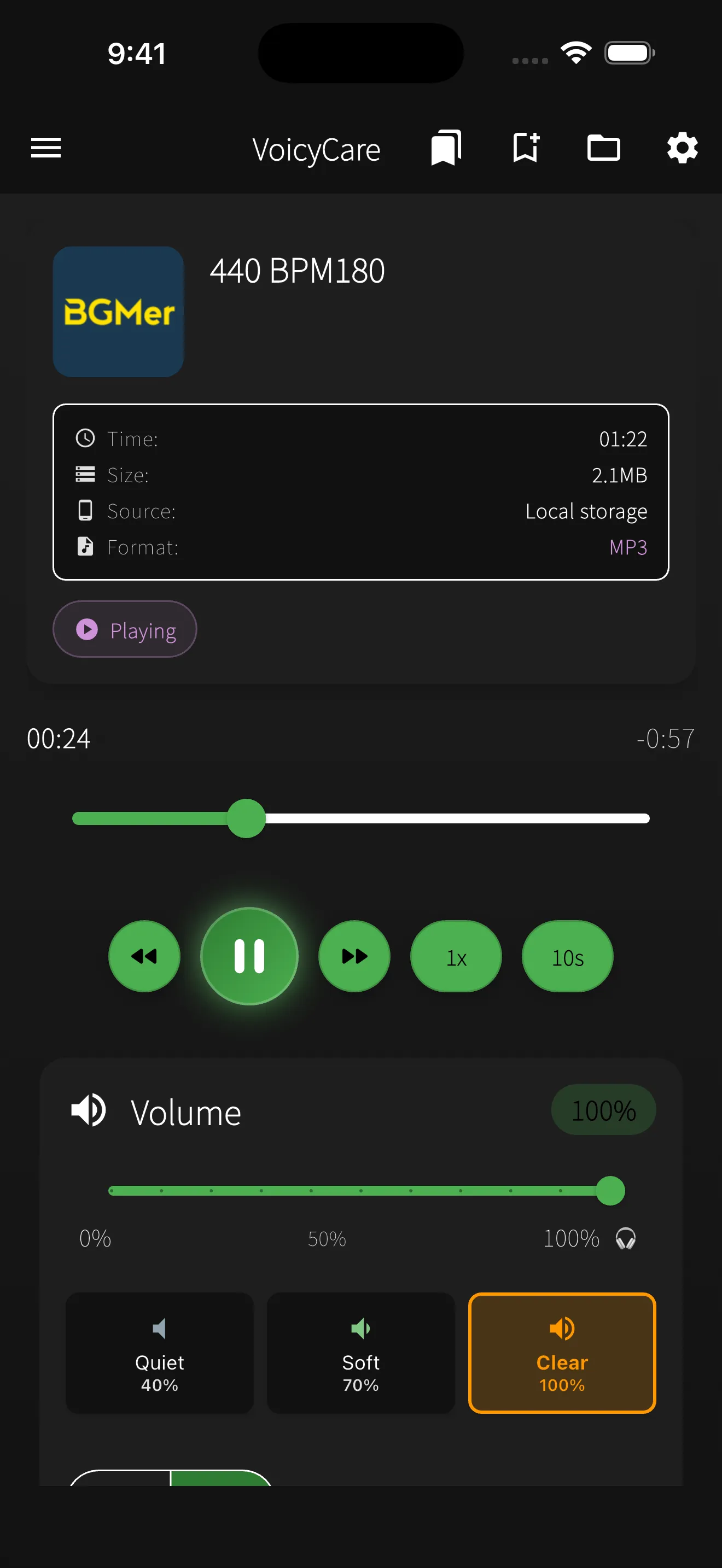
VoicyCare Playback Screen

Features

500% (5x) Volume Boost

Powerful amplification for headphone use to make quiet audio clearer. Safe high-volume playback with volume-exceed alerts.

  • Headphone-focused amplification
  • Warning displayed when volume exceeds 100%
  • Fine-grained volume steps

Readable, Easy-to-use UI/UX

Large fonts (150% of standard) and high contrast design for comfortable operation. Designed with VoiceOver/TalkBack in mind.

  • Large tap targets
  • Intuitive icons
  • High-contrast palette

Volume & Sound Presets

5 volume presets and simple/advanced sound settings for optimal listening.

  • Volume presets: Soft(30%) / Normal(70%) / Clear(100%) / Crisp(130%) / Powerful(150%)
  • Sound presets: Soft(0.8x) / Quiet(0.9x) / Clear(1.2x)
  • EQ presets (Classic/Vocal/Rock/Flat)

Multi-Cloud Support

Play audio from iCloud, Dropbox, Google Drive, OneDrive via iOS Files app.

Advanced Playback

AB repeat, bookmarks, playback speed (0.5x–2.0x), playlists, and 5-band equalizer.

Ads & Consent

No ads on playback screen. Frequency is limited.

Safety Features

Alerts for amplification and break reminders.

Screenshots

Recommended For

People who find it hard to hear

Designed to make music enjoyable again with clear sound and large controls.

Hearing aid users

Optimized for use with hearing aids by combining amplification and EQ.

Caregivers & Families

Simple UI that is easy for everyone to operate together.

Language Learners

Speed control and AB repeat help with listening practice.

FAQ

Is 500% volume safe?
VoicyCare supports up to 500% (5x) volume amplification, but we do not recommend using maximum volume at all times. According to WHO guidelines, prolonged exposure to sound above 85 dB may cause hearing damage. VoicyCare is designed to help people with hearing difficulties enjoy music at a comfortable level. We recommend starting with lower amplification and adjusting gradually until the sound is clear. The built-in 5-band equalizer lets you boost specific frequency ranges for better clarity without raising overall volume excessively. If children are using the app, parents should set an appropriate volume level beforehand.
Can I use it without cloud storage?
Yes, all core features of VoicyCare work without cloud storage. You can play music files stored on your iPhone and use volume amplification, the 5-band equalizer, AB repeat, and playlist features entirely offline. Cloud integration is optional: from v1.4.6 you can play audio stored on iCloud Drive, Dropbox, Google Drive, or OneDrive via the iOS Files app. This is useful if you want to access a large music library without using up your device storage.
What formats are supported?
VoicyCare supports a wide range of audio formats including MP3, WAV, M4A, FLAC, AAC, and AIFF. Whether your music comes from iTunes purchases, CD rips, or high-resolution FLAC downloads, VoicyCare can play them all. You can open files from iCloud Drive, Dropbox, Google Drive, OneDrive, and more through the iOS Files app. Please note that DRM-protected files may not be playable. While Apple Music streaming tracks are not supported, any DRM-free downloaded tracks will work. This broad format support ensures you can enjoy your entire music library with enhanced volume and equalizer features.
Where are ads shown?
VoicyCare is a free app supported by advertising, but we prioritize your listening experience above all else. Ads are never displayed on the playback screen, so your music is never interrupted by advertisements. Banner ads appear only on non-playback screens such as the home screen and file selection screen. The frequency of ads is kept deliberately low to maintain a smooth user experience. As an app designed to support hearing accessibility, we take great care in placing ads where they do not interfere with the core purpose of helping users enjoy music comfortably.
Where is my data stored?
All VoicyCare data is stored locally on your iPhone. Your equalizer settings, volume presets, playlists, and playback history remain on your device and are never sent to external servers. We do not collect any personally identifiable information, and no account registration is required to use the app. When you play files from cloud services (iCloud Drive, Dropbox, Google Drive, OneDrive) through the iOS Files app, iOS handles the authentication — VoicyCare itself does not store any cloud credentials. For complete details, please review our Privacy Policy.
Can children use the app?
VoicyCare is rated 4+ on the App Store and is suitable for users of all ages. However, we recommend that children under 13 use the app with parental consent and supervision. Parents should set appropriate volume levels to protect their child's hearing, especially when using the volume amplification feature. The app is also useful for educational purposes such as language learning and music education. The AB repeat function allows specific passages to be looped for repeated listening, making it an excellent tool for English listening practice or music lessons.
How is this different from a hearing aid?
VoicyCare is a music player app that amplifies audio playback, and is fundamentally different from hearing aids, which are medical devices. Hearing aids are calibrated to an individual's hearing test results and correct specific frequency ranges to improve everyday conversation and environmental sound perception. VoicyCare, on the other hand, boosts music file playback volume up to 500% (5x) and lets you fine-tune sound quality with a 5-band equalizer. If you suspect hearing loss, please consult an ENT specialist. VoicyCare is not a hearing aid replacement — it's a tool to help you enjoy music more comfortably.
Which cloud services are supported?
From v1.4.6, VoicyCare supports iCloud Drive, Dropbox, Google Drive, and OneDrive via the iOS Files app. Install each cloud's official app on your iPhone and enable it in the Files app — you can then open audio files directly from VoicyCare's file picker. You don't need to download files to your device in advance; VoicyCare copies the file into its cache once and plays it from there.
Is there an Android version?
VoicyCare is currently available exclusively for iOS (iPhone / iPad) on the App Store. An Android version is not currently planned, but we may consider it if there is significant user demand. Please send your requests through our contact form.
Can I play Apple Music or Spotify songs?
Songs from streaming services like Apple Music and Spotify are protected by DRM (Digital Rights Management) and cannot be played directly in VoicyCare. VoicyCare supports DRM-free files including MP3, WAV, M4A, FLAC, AAC, and AIFF. Music purchased from the iTunes Store, ripped from CDs, or downloaded from royalty-free music sites will work without any issues.

Helpful Articles

Tips and guides about volume boosting and listening assistance

View All Articles

Download

iOS version available

VoicyCare is available on the App Store.

Note: VoicyCare supports listening but is not a medical device. Consult a physician for medical concerns.
Pricing: Free to use. Ads are not shown on the playback screen.